Microsoft Dynamics AX 2012 Application Lifecycle Management (ALM-I)
Although it may seem curious, even unsettling, a large part of ERP implementation projects, including the Dynamics family in general and Microsoft Dynamics AX in particular, are not run as software projects. Perhaps because of how close the project is to the business, or because the people involved spend most of their time with a business-oriented rather than software-oriented mindset, it is very common to forget, or ignore, that we are implementing software and therefore it is advisable to treat the project as a software project, applying software engineering concepts to manage the software and project management concepts to manage the project.
I have already discussed in previous articles different implementation methodologies such as Microsoft Sure Step or agile methodologies that more and more people are adopting, including Microsoft. They are not the only ones; each company uses the ones it knows and considers most suitable for each project, such as PMBOK or PRINCE2 or more software- and technology-specific techniques such as CMMI and ITIL, and some companies even “design” their own. The problem is that it is too common to use none at all, or to choose one that does not cover the full lifecycle of an application. Some might think: “Are you criticizing the usefulness of methodologies used by most multinationals in the world for years?” No. Of course not. I do not even know most of them well enough to have an opinion. What is clear, by their own definition, is that they are proposals oriented toward managing the project itself (scope, resources, time, cost, materials,…) but they do not specifically address software-related problems, which are often forgotten because they are not part of formal procedures. In short, limitations and risks (what cannot be done) are managed more than what SHOULD be done. In other words, these methodologies (which are fully valid) are being used to manage concepts that are NOT software. To improve this, we must turn to the often-forgotten software engineering and to a concept that any company dedicated exclusively to producing software has fully integrated in its daily operations and profitability: the application lifecycle (or Application Lifecycle Management, or simply ALM).
Wikipedia gives a good definition of Software Engineering (translated). It may not be the best source, but it is the most accessible:
[…] Software Engineering is the application of a systematic, disciplined and quantifiable approach to the design, development, operation and maintenance of software […] Now it is worth asking whether the method we are using in our environment (I am optimistic and assume at least one is already being used) follows these simple guidelines (systematic, disciplined, and quantifiable) across all lifecycle areas (from development to maintenance, including change management). If so, congratulations; if not, you will be interested in the rest of this article and those that follow…
Processes
It is important to keep in mind that for any methodology we choose to work, the emphasis must be on procedures, not on tools (software, documentation, …). Tools are important, but they are useless and can even become counterproductive if they are not supported by established methods with a clear, specific, and measurable purpose.
Which high-level processes should be part of an ALM strategy?
- Project management and planning
- Metrics management useful for planning, control, and forecasting
- Requirements management
- Feature management and tracking
- Source code management
- Version control
- Test management and automation
- Build and deployment management and automation
- Environment and configuration management
- Incident resolution flow management and tracking
Advantages
- Developing and following repetitive, consistent methods improves team productivity by enabling reuse of previous decisions and more controlled execution.
- Good application management from requirements to support improves the quality of the delivered product.
- A consistent and predictable set of processes improves collaboration among people and teams, avoiding retraining on how each project was handled.
- It improves speed and consistency for installations and subsequent deployments of new versions by relying on known, tested procedures.
- It improves costs and timelines by avoiding surprises and minimizing risks.
- It increases team innovation. By leveraging knowledge from previous projects, teams can focus more on specific requirements and solving new problems, instead of spending time on problems that were already solved.
Drawbacks
- As incredible as it may seem (it does to me), there are still teams that do not consider lifecycle management methodologies appropriate, or even consider them unnecessary and counterproductive. I recently read a sentence that reminded me of the times I had to work in one of those projects:
There is never time to do things right, but always time to do them twice…
Tools
Tools can be very diverse: from template documents, whiteboards, and sticky notes, to complex software systems. But above all, they must complement and facilitate processes, never the other way around. Tools make work easier and enable methodology adoption, but tools ARE NOT the methodology.
Since we are talking here about Microsoft in general and Microsoft Dynamics AX in particular, and considering that a project team of this kind necessarily includes different people often distributed across different locations, adopting some software tool to help with the task is almost essential (again: help).
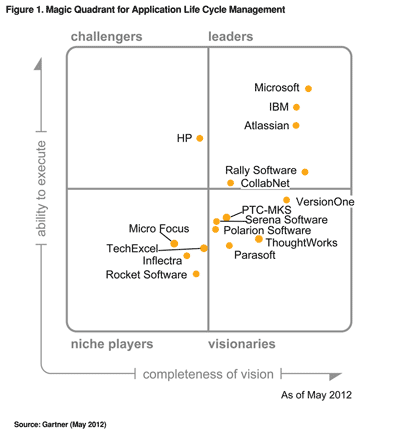
There are many tools and many vendors building products to facilitate ALM processes. It is not mandatory to use only one, so it is worth investigating the best option (in our company we use Atlassian JIRA with good results for incident management). The following image shows the latest Gartner ALM Magic Quadrant where Microsoft appears in the leaders quadrant:
Speaking specifically about Microsoft Dynamics AX, the tool that provides the best integration for a large part of lifecycle phases is Team Foundation Server (or its new online variant Team Foundation Service, which I have not been able to test yet). It facilitates processes that Microsoft Dynamics AX cannot solve by itself. There is also Microsoft Project Server, although I will not go into detail because that integration is not intended for implementation project management but as part of Microsoft Dynamics AX project module functionality.
I will talk about these tools and their application to Microsoft Dynamics AX projects in the next chapters :)
Posts in this series
- Automatic BUILD Processes with TFS and AX 2012 (2/2) (ALM-X)
- Automatic BUILD Processes with TFS and AX 2012 (1/2) (ALM-IX)
- Microsoft Dynamics AX 2012 Label Codes Using Team Foundation Server Branches (ALM-VIII)
- Version Control in Microsoft Dynamics AX 2012 Using Team Foundation Server Branches (ALM-VII)
- Source Code Control with TFS in Microsoft Dynamics AX 2012 (ALM-VI)
- Read Team Foundation Server Items from Microsoft Dynamics AX 2012 (ALM-V)
- Download Microsoft Dynamics AX 2012 Application from Team Foundation Server (ALM-IV)
- Microsoft Dynamics AX 2012 ALM with Team Foundation Server (ALM-III)
- Team Foundation Server 2010 Installation (ALM-II)
- Microsoft Dynamics AX 2012 Application Lifecycle Management (ALM-I)