In Search of the Lost Table... Table Inheritance in AX 2012
If you have ever created or maintained a solution that accesses the Microsoft Dynamics AX 2012 database directly (for example, an external Business Intelligence system), you may have seen the “ghost table” behavior. There are many examples; let us analyze the OMOperationUnit table.
This table exists in the AOT, we can inspect it from Dynamics AX, and we can see that it contains data, so that data must be stored somewhere. However, the table does not exist in the underlying SQL Server database. So where is the data?
First, we should notice this behavior appears in inherited tables or tables supporting inheritance, for example:
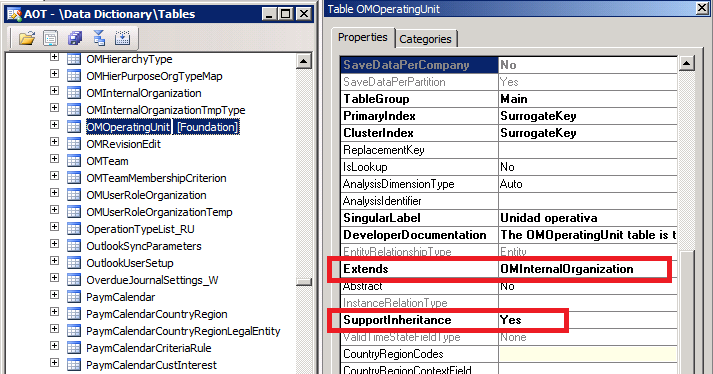
Because the table exists and stores data in the AOT, it is obvious that data must exist in the database. A good X++ tool we have is the getSQLStatement method, which can be used in buffer variables or in queries like this:
static void Job43(Args _args)
{
    OMOperatingUnit tabla;

    select generateOnly tabla;

    info(tabla.getSQLStatement());
}
This method returns the SQL statement that will be sent to the database to retrieve data requested from X++. Here we find the explanation for the ghost table:
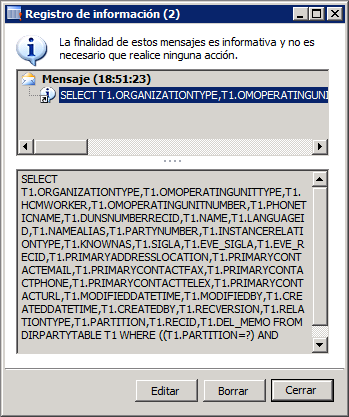
If we carefully analyze that SQL, or run it directly against SQL Server, we discover the internal structure that the AOT generated in the database to store data from inherited tables:
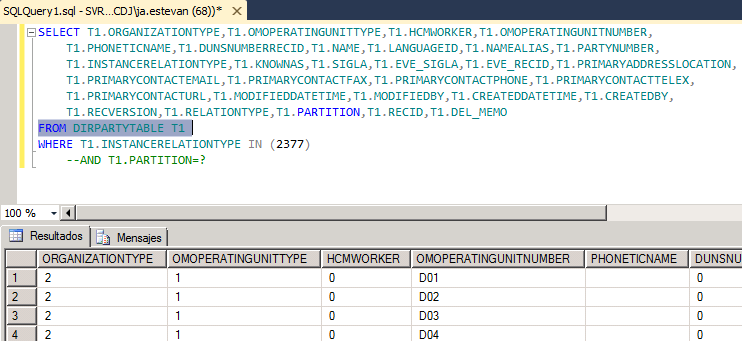
In this case, the inherited table gets data from completely different tables using filters. Depending on the inherited table type, physical storage may look different, but this approach still gives us a valid query we can use from external systems. We can also create a SQL view from that query to simulate the table if needed.