HOWTO: Events in AX 2012 to Minimize Conflicts
As you can guess from some of my previous posts, I am a faithful defender of one of the great forgotten things of AX 2012: Events
In my effort to evangelize for its use, I’ve come across a very clear example of its advantages. At this point I suppose almost everyone knows the possibility of adding new options to the Add-Ins menu of the AX 2012 development environment and earlier. It’s really easy, you just have to create a new class with a regular main method, a menu item that points to that class, and add the menu item to the standard SysContextMenu menu. With this we get our menu item to appear when we right-click on AOT elements, for example (Startup Project is the new add-in):
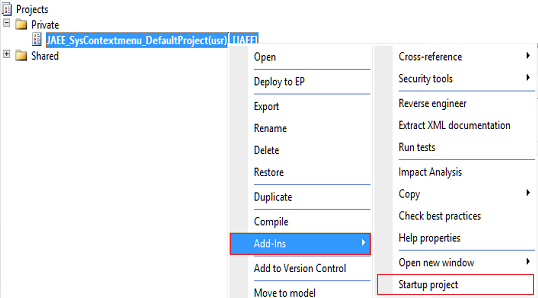 However, to do it really well, some additional modifications are needed. In my example, the new add-in is used to convert the selected project into the startup project for the current user. It’s simple, but it serves us as an example of a add-in that should only appear when we right-click on a project, and not on any other type of AOT element. For that, as the documentation shows, we must modify the verifyItem method of the SysContextMenu class, which is a nightmare of if-else and switches to determine whether the element should be displayed or not, depending on the class that calls it, the type of element and a long and disastrous etcetera.
But we are elegant programmers so, in order not to contribute to worsening that disaster, instead of modifying the method we’re going to add an event handler (Event Handler) by right-clicking on the method.
However, to do it really well, some additional modifications are needed. In my example, the new add-in is used to convert the selected project into the startup project for the current user. It’s simple, but it serves us as an example of a add-in that should only appear when we right-click on a project, and not on any other type of AOT element. For that, as the documentation shows, we must modify the verifyItem method of the SysContextMenu class, which is a nightmare of if-else and switches to determine whether the element should be displayed or not, depending on the class that calls it, the type of element and a long and disastrous etcetera.
But we are elegant programmers so, in order not to contribute to worsening that disaster, instead of modifying the method we’re going to add an event handler (Event Handler) by right-clicking on the method.
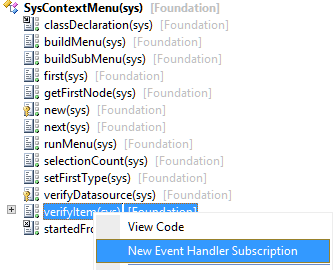 We adjust the properties of the new event handler so they point to a new class we’ve created for our add-in:
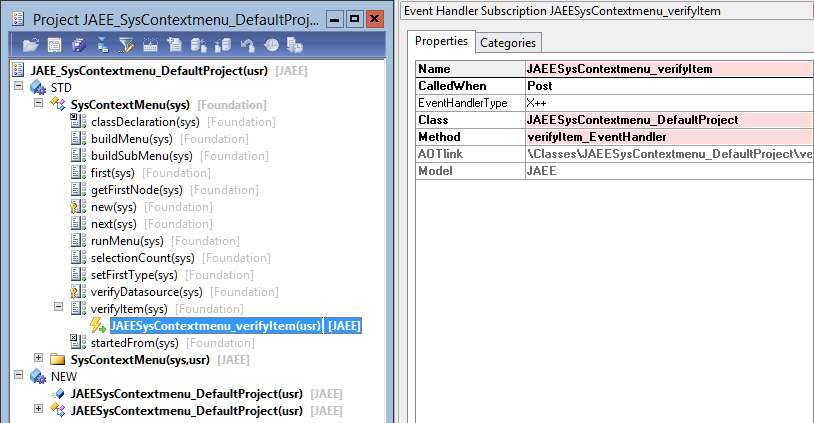 The code that handles the event, more or less the same code we would have included in the original method, is as follows:
/// /// Event-Handler that will decide if the menuitem is shown or not.
///
///
/// IdentifierName menuItemName
/// MenuItemType menuItemType
///
/// /// It is important not to break here the behavior of the original method
///
public static void verifyItem_EventHandler(XppPrePostArgs _args)
{
JAEESysContextmenu_DefaultProject defaultProjectClass;
SysContextMenu contextMenu = _args.getThis();
// Original method arguments
IdentifierName menuItemName = _args.getArgNum(1);
MenuItemType menuItemType = _args.getArgNum(2);
if (menuItemType == MenuItemType::Action &&
menuItemName == menuitemActionStr(JAEESysContextmenu_DefaultProject))
{
// We do not allow selecting multiple projects
if (contextMenu.selectionCount() == 1)
{
defaultProjectClass = JAEESysContextmenu_DefaultProject::construct(contextMenu);
// I modify the return value of the original method
_args.setReturnValue(defaultProjectClass.isProjectMenu() ? 1 : 0);
}
else
{
_args.setReturnValue(0);
}
}
}
In this way our event handler runs after the original verifyItem has been executed, allowing us to modify the return value but, as can be seen in the previous image, NOT the original class has been modified which remains in the sys layer and the Foundation model and, therefore, will not affect future product updates. We have modified the functionality of the standard class without causing any impact on it.
The project containing the fully functional add-in can be downloaded from the link at the bottom of this post, what it does we could summarize in these methods:
The main method is called when you click on the menu item, it’s the entry point of the add-in. What it does is verify that it has indeed been called from a Project type element and if so, it updates the user by assigning this project as the startup project in the options:
static void main(Args _args)
{
JAEESysContextmenu_DefaultProject defaultProjectClass;
if (!_args)
throw error(Error::wrongUseOfFunction(funcname()));
if (SysContextMenu::startedFrom(_args))
{
defaultProjectClass = JAEESysContextmenu_DefaultProject::construct(_args.parmObject());
// The call to this function is only allowed from Projects
if (defaultProjectClass.isProjectMenu())
defaultProjectClass.updateStartupProject();
else
throw error(Error::wrongUseOfFunction(funcname()));
}
}
To check if the element that called this class is a project I use my isProjectMenu function. This logic can be obtained by looking at the existing methods of the standard SysContextMenu class:
private boolean isProjectMenu()
{
TreeNode firstNode = sysContextMenu.first();
if (firstNode.handle() == classnum(ProjectNode))
return true;
return false;
}
The final update to assign the startup project is very simple:
private void updateStartupProject()
{
UserInfo userInfo;
ttsBegin;
The code that handles the event, more or less the same code we would have included in the original method, is as follows:
/// /// Event-Handler that will decide if the menuitem is shown or not.
///
///
/// IdentifierName menuItemName
/// MenuItemType menuItemType
///
/// /// It is important not to break here the behavior of the original method
///
public static void verifyItem_EventHandler(XppPrePostArgs _args)
{
JAEESysContextmenu_DefaultProject defaultProjectClass;
SysContextMenu contextMenu = _args.getThis();
// Original method arguments
IdentifierName menuItemName = _args.getArgNum(1);
MenuItemType menuItemType = _args.getArgNum(2);
if (menuItemType == MenuItemType::Action &&
menuItemName == menuitemActionStr(JAEESysContextmenu_DefaultProject))
{
// We do not allow selecting multiple projects
if (contextMenu.selectionCount() == 1)
{
defaultProjectClass = JAEESysContextmenu_DefaultProject::construct(contextMenu);
// I modify the return value of the original method
_args.setReturnValue(defaultProjectClass.isProjectMenu() ? 1 : 0);
}
else
{
_args.setReturnValue(0);
}
}
}
In this way our event handler runs after the original verifyItem has been executed, allowing us to modify the return value but, as can be seen in the previous image, NOT the original class has been modified which remains in the sys layer and the Foundation model and, therefore, will not affect future product updates. We have modified the functionality of the standard class without causing any impact on it.
The project containing the fully functional add-in can be downloaded from the link at the bottom of this post, what it does we could summarize in these methods:
The main method is called when you click on the menu item, it’s the entry point of the add-in. What it does is verify that it has indeed been called from a Project type element and if so, it updates the user by assigning this project as the startup project in the options:
static void main(Args _args)
{
JAEESysContextmenu_DefaultProject defaultProjectClass;
if (!_args)
throw error(Error::wrongUseOfFunction(funcname()));
if (SysContextMenu::startedFrom(_args))
{
defaultProjectClass = JAEESysContextmenu_DefaultProject::construct(_args.parmObject());
// The call to this function is only allowed from Projects
if (defaultProjectClass.isProjectMenu())
defaultProjectClass.updateStartupProject();
else
throw error(Error::wrongUseOfFunction(funcname()));
}
}
To check if the element that called this class is a project I use my isProjectMenu function. This logic can be obtained by looking at the existing methods of the standard SysContextMenu class:
private boolean isProjectMenu()
{
TreeNode firstNode = sysContextMenu.first();
if (firstNode.handle() == classnum(ProjectNode))
return true;
return false;
}
The final update to assign the startup project is very simple:
private void updateStartupProject()
{
UserInfo userInfo;
ttsBegin;
select firstOnly forUpdate userInfo index hint Id where userInfo.id == curUserId();
if (userInfo.startupProject != sysContextMenu.first().treeNodeName())
{
    userInfo.startupProject = sysContextMenu.first().treeNodeName();
    userInfo.update();
}

ttsCommit;

// TODO Create label
info(strFmt("%1 is now your starting project.", sysContextMenu.first().treeNodeName()));
}
The use of events has not become generalized during the AX 2012 lifecycle (probably never will in this version) but will be an important part of the development stack of the next version, so it’s good to get used to them in time, and also facilitate the maintenance work of current installations :)
Download