Development in Dynamics AX 7: The New Architecture
Table of contents
While we wait for the final version of “The New” AX or Dynamics AX 7 to be released, we can start understanding the system’s foundations using the published information and public preview. Before diving into analyzing the details of the new version, which are many and will take us quite some time, we need to understand the fundamentals that have motivated all these changes and that will allow us to better understand the new way of developing, which although it uses tools similar to previous versions, we will see are completely different.
Model Store vs Local Repository
In previous versions, code and metadata were stored in layer files (AX 2009) and later in databases, either a dedicated database (AX 2012 R2+) or in the business database itself (AX 2012 RTM). This simple fact conditioned the tools we could use to work with this code and metadata. That is, programming, creating new objects, testing, compiling, etc…
In AX 7, code is stored in files on disk, as in most modern languages, where we have the version of the files we are modifying. Not in XPO files as in previous versions, but in a new format that we will discuss later, and these new files can be opened from Visual Studio using Projects and Solutions unique to this editor to organize our developments.
Models vs Packages
Apart from this change in metadata storage and management, in the new version X++ is a complete and native language of the .NET platform, and therefore the compiler and execution are the same as in .NET languages. The most obvious result of this change is that the compiled code (which in the previous version was also saved in the database) generates assemblies (DLL libraries) that run in the CLR, like the rest of the .NET platform.
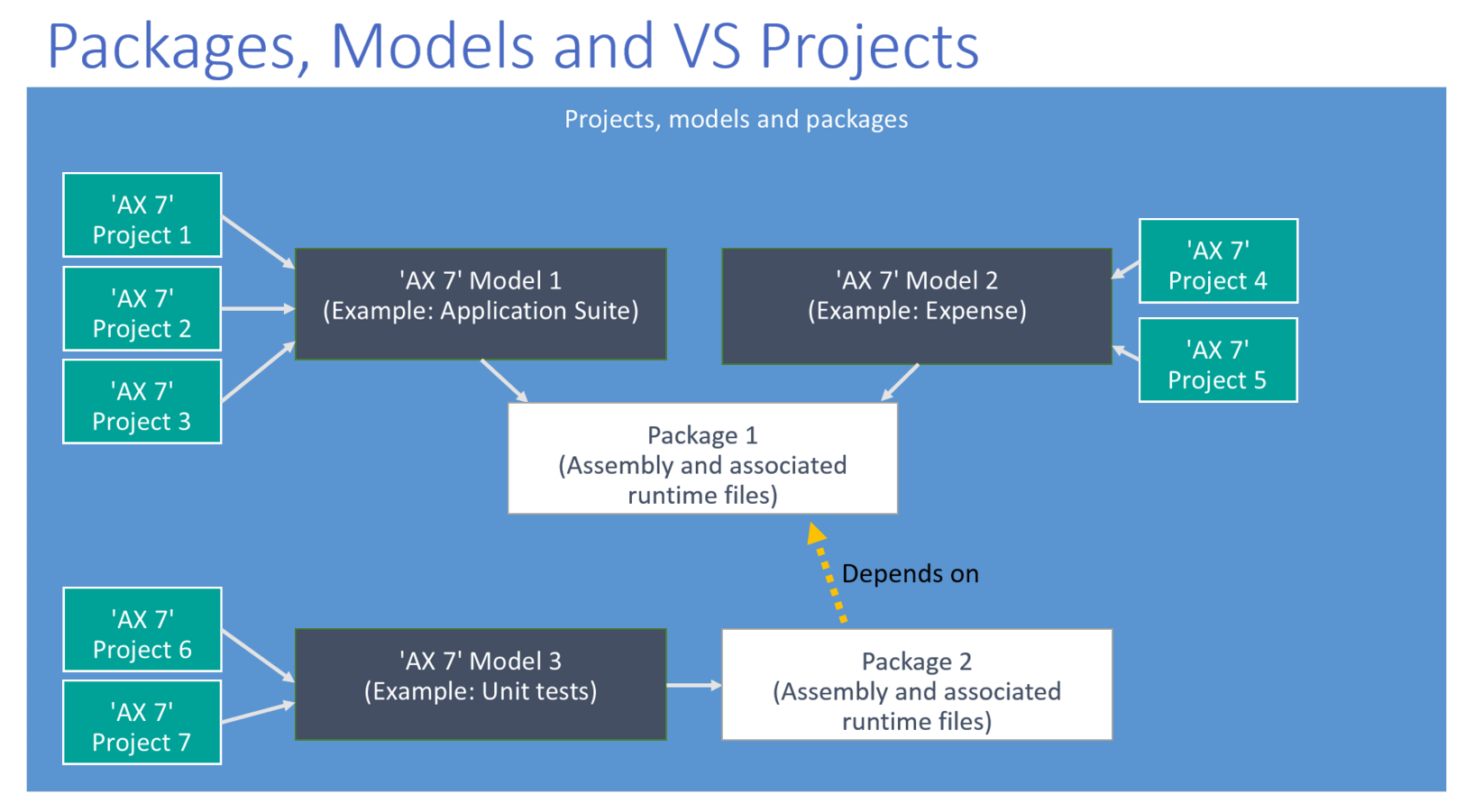
These assemblies correspond to what we logically call Packages (Packages) within AX 7. Creating new packages will mean that the code is compiled into new assemblies, allowing a granularity that will allow us very efficient compile times, since it will only be necessary to compile the assemblies that have undergone changes. Adding to this that a double compilation is no longer necessary (X++ and CIL), since all code is now compiled directly to CIL, we will achieve very reduced compile times that will facilitate the adoption of good practices and the use of .NET tools to improve the quality of developments, both the final result and the ALM process itself, for example Builds fast enough to run them on every code check-in to TFS, unit testing, etc.).
Extension vs Customization
Having clarified all of the above, we are now able to understand the most important change we will face as developers of the new version. The old philosophy for editing an object was simply to edit it. The system took care of, thanks to the layer system, integrating our changes with standard objects (or those from other partners or ISVs) by creating copies of the layers and compiling the final version. This is the process called Overlayering that we have always used.
This process is still possible in AX 7, where it is called Customization. When we customize an object, the system integrates our changes into a result similar to the usual one with layers, and compiles the final version in the assembly where this code originally existed:
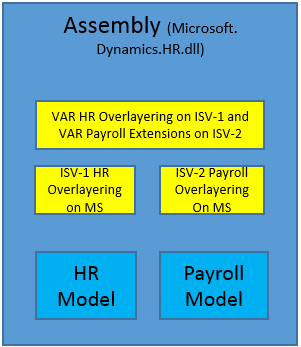
This is our natural way of working so far. In AX 2012 we already had the Event model to avoid these customizations as much as possible, but it didn’t become widespread because its use, although very practical, was quite limited.
However, in AX 7 the recommended way to perform all our modifications is called Extension. Although at launch not all changes can be made by extension (this deserves another post), most can be done, and we should do so. Through extensions, the original assemblies are kept intact, while the extensions themselves generate new assemblies dependent on the originals.
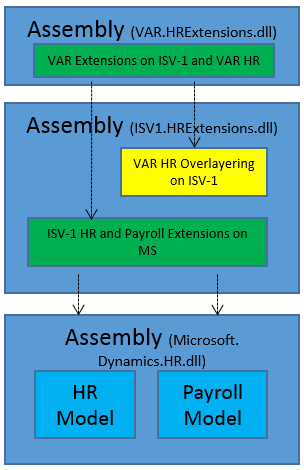
This model is desirable for many reasons, the most obvious ones being those related to version migrations. If we never touch the standard assemblies, installing a new version of the product will avoid us almost all conflicts, except if our extension is not compatible with the new version. Even in this case, the problem will be limited to that extension (and its dependencies) and will be easier to fix, and even understand since the context of the change will be very limited.
Another advantage is that this way we avoid compiling almost all assemblies since we will only have to compile the extensions we have touched in each case, which will be very small (these assemblies only store the delta with respect to the original, what is different, not the entire object), which will allow us to compile and execute objects immediately.
And finally, although it may or may not be considered a direct advantage, this architecture allows a clear orientation towards a SaaS model in which Microsoft offers us a standard AX 7 in the cloud capable of automatically updating itself, since our objects will always be in different assemblies. It is not something that is planned in the short term (that I know of), but it opens the possibility that someday something similar might be offered.
All of this is, of course, a very brief introduction to concepts. In future posts we will go into detail on all of them.
NOTE: The images in this post are taken from the new AX 7 Wiki which is worth taking a look at!