PowerShell for Automated Administration of Dynamics AX 2012 (PS-II)
Table of contents
In the first entry of this PowerShell and DevOps series for Microsoft Dynamics AX 2012 we discussed the most basic PowerShell principles and syntax. We also saw in previous post entries how PowerShell can be used in very creative ways.
This time we are going to review cmdlets specifically for Microsoft Dynamics AX 2012 administration, which we can split into several groups:
Model and Model Store Management
These cmdlets are very important and will be the foundation of our DevOps strategy, combined with the automated build processes configured in TFS, if you use them.
The combination of these components allows us to design processes that automatically update our environments, pushing our operations toward continuous integration or continuous deployment, especially in development and test environments. We will cover this in the next posts in this series.
These are the ones we normally use for these tasks, although it is worth checking the full reference because all of them can be useful for specific tasks or broader automation scripts:
Models
| Command | Description |
|---|---|
| New-AXModel | Creates a new model in the Model Store |
| Uninstall-AXModel | Deletes a model from the Model Store |
| Install-AXModel | Imports a model (from a file) into the Model Store |
| Export-AXModel | Exports a model from the Model Store to an .axmodel file |
| Move-AXModel | Moves objects from one model to another, combining all objects in the target model. |
Model Store
| Command | Description |
|---|---|
| Import-AXModelStore | Imports a Model Store (from a file) |
| Export-AXModelStore | Exports a Model Store to an .axmodelstore file |
| Initialize-AXModelStore | Initializes a model store to be used. It is recommended to run this command after certain maintenance operations. |
| Optimize-AXModelStore | Optimizes and reindexes the model store to improve performance. It is recommended to run this command after certain maintenance operations. |
| Set-AXModelStore | Assigns flags in the Model Store that indicate operations performed on it. These flags affect, for example, whether the model upgrade cockpit is shown at client startup: -InstallMode (show cockpit) or -NoInstallMode (do not show cockpit) |
- Reference: Model and model store cmdlets
Report and Reporting Services Management and Deployment
Report management is another task we can automate in our builds or deployment scripts. Here are some of the most commonly used commands, but there are many more; check the full reference:
| Command | Description |
|---|---|
| Publish-AXReport | Publishes a report from AOS to the SSRS Report Server. It is recommended to review this command documentation because it includes very useful parameters for optimized report deployment. |
| Test-AXReportServerConfiguration | Validates configuration and connectivity between AOS and Report Server. This command is useful when you have deployment/printing issues, to detect configuration problems or failing components. |
| Get-AXReportServerConfiguration | Shows current configuration, including settings visible in the corresponding form in Dynamics AX 2012 and additional parameters. |
| Get-AXReport | Shows report details such as creation/modification date, modified-by user, design list, related Visual Studio AOT project, etc. This command is very useful in deployment scripts, and often directly in console sessions when troubleshooting report issues. |
- Reference: Report server management cmdlets
User Management and Security Artifacts
Another area where PowerShell is very useful both in console and in automation scripts is user management and, in AX, security role management as well.
As we will see, PowerShell is not limited to AX. It includes all Windows capabilities, so these commands can be combined with Active Directory cmdlets to automatically create, maintain, and monitor AX users based on domain changes.
Users
| Command | Description |
|---|---|
| New-AXUser | Creates a new User |
| Disable-AXUser | Disables a User |
| Get-AXUser | Returns a list of all Users. This command also returns useful data such as each user’s Active Directory SID, making it an ideal integration point between Dynamics AX security and domain users. |
Roles
| Command | Description |
|---|---|
| New-AXSecurityRole | Creates a security Role |
| Remove-AXSecurityRole | Deletes a security Role |
| Add-AXSecurityRoleMember | Adds a User to a Role |
| Get-AXSecurityRole | Returns the list of Roles assigned to a User |
| Get-AXSecurityRoleMember | Returns the list of Users assigned to a Role |
| Get-AXSecurityRoleInfo | Returns information about all Roles in the system |
- Reference: User and role-based security cmdlets
I must insist on reviewing the full reference. There is no point in reproducing the complete command list here, so I only included the most relevant ones, but there are many more and they are worth knowing:
AX Is Not the Whole Story
So far I have focused only on cmdlets available in Dynamics AX 2012 administration tools. But we should not stop there. For advanced automation tasks we need to integrate with the rest of the system and use not only generic PowerShell commands but also cmdlets from products such as Analysis Services, Sharepoint, Active Directory, SQL Server, Azure services, … any Microsoft product includes a PowerShell module to interact with its components.
For example, some time ago I showed how to retrieve user information from Active Directory using X++; the same can be done from PowerShell and quickly reused by admins without opening AX. I also showed how to use PowerShell to assign our active user to an AX database restored from another domain to regain admin access, as an example using the SQL Server module. And we could keep going…
Examples of modules we may use:
- Active Directory Domain Services Administration Cmdlets in Windows PowerShell
- SQL Server with Windows PowerShell Cmdlets
- Windows Azure Pack for Windows Server Automation with Windows PowerShell
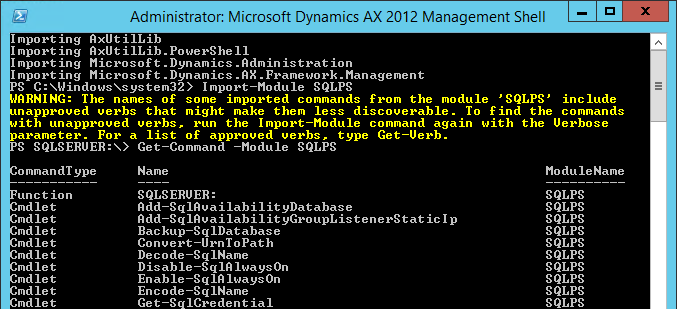
Using these modules is fairly intuitive. After importing a module with Import-Module, we can use the cmdlets introduced in our PowerShell introduction, such as Get-Command and Get-Help, to discover available commands and usage.
Reuse Is the Key
As with any console or scripting language, we should avoid reinventing the wheel by writing scripts that someone else has likely already built. Searching online, you can find scripts for nearly any administration task using PowerShell.
Also, there are several initiatives publishing scripts specific to Microsoft Dynamics AX 2012. The most remarkable, in my opinion, is the script package published by Martin Dráb on CodePlex, which includes actions for almost every stage of automated deployment. You can practically build a complete build + environment update system using PowerShell only.
This package may or may not fit your needs, but in any case it is a great codebase to learn from and a solid starting point for your own scripts, including good AX-specific patterns to connect to AX servers. You can download it here:
Extra
As a final note, I want to mention an article that is worth checking more for its possibilities than for immediate practical use. Remember that PowerShell can use .NET assemblies, including the AX .NET Business Connector. That article shows an example of this usage, whether it is practical in your case or not ;)
And this is the end of part two. After the initial introduction, this is the starting point to build our own DevOps scripts for AX 2012!
Posts in this series
- PowerShell and Startup Commands in Dynamics AX 2012 (PS-III)
- PowerShell for Automated Administration of Dynamics AX 2012 (PS-II)
- Introduction to PowerShell for Dynamics AX 2012 Developers (PS-I)