
Microsoft Dynamics AX 7 Virtual Launch Event
As expected, the official launch of the upcoming Microsoft Dynamics AX will take place at the beginning of next month in a public and online event that will repeat at different times to facilitate attendance from around the world.
More information can be found on the event website but here’s the basics:
- Sessions
- March 8, 2016 / 6:00 pm – 7:00 pm PST (3:00 am to 4:00 am in Spain)
- March 9, 2016 / 8:00 am – 9:00 am PST (5:00 pm to 6:00 pm in Spain, if I converted it correctly)
- Agenda
- Executive Welcome
- Customer Demos & Insights
- Transform business faster
- Grow at your pace—evolve your business with the choice and flexibility of the cloud
I won’t miss it. What about you? :)
Read moreDevelopment in Dynamics AX 7: The New Architecture
While we wait for the final version of “The New” AX or Dynamics AX 7 to be released, we can start understanding the system’s foundations using the published information and public preview. Before diving into analyzing the details of the new version, which are many and will take us quite some time, we need to understand the fundamentals that have motivated all these changes and that will allow us to better understand the new way of developing, which although it uses tools similar to previous versions, we will see are completely different.
Read more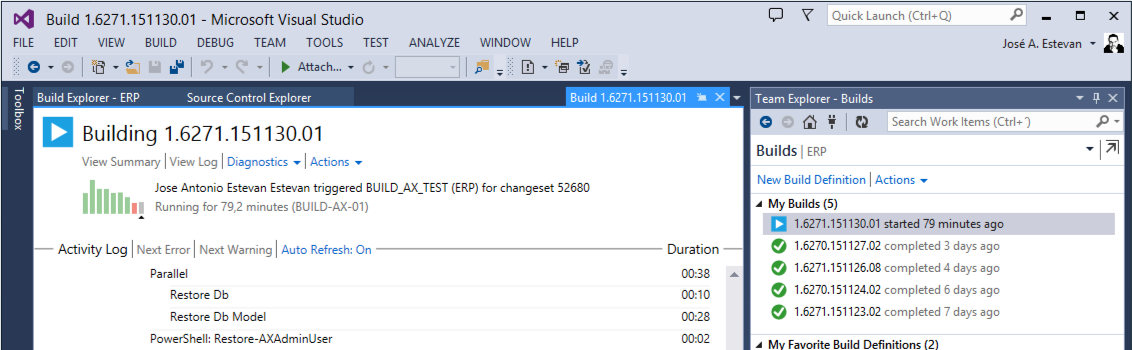
Automatic BUILD Processes with TFS and AX 2012 (2/2) (ALM-X)
In the previous article in this series we defined the main process to configure a Microsoft Dynamics AX 2012 Build in TFS, in summary:
- Install and configure the necessary TFS components on the build server (Agent, Controller, etc.).
- Create a new project with custom activities and the default template.
- Upload all of this to the source code repository in TFS or Team Services so the Controller can access them.
- Add these references to Visual Studio so it recognizes the new activities.
- Create a new Build definition using the downloaded template.
We were left executing this newly created Build definition with all options, activities and default template, and after which we received an error. Frustrating, isn’t it? It may be, but if you think about it, it’s quite logical, let’s see:
Read moreMicrosoft Dynamics AX 7 and the New X++
The new Microsoft Dynamics AX also brings with it “the new X++”. Most of the changes received by the new X++ are related to the compiler and the tools to develop it. The compiler is completely new, making X++ another language in the .NET stack, which has allowed it to be fully integrated with Visual Studio and to avoid the two-part compilation of previous versions: No more p-code, all X++ code is now compiled directly to CIL. But we’ll talk about that another day, today we’re going to see the changes in the language itself, the syntax, available in the new version:
Read moreAutomatic BUILD Processes with TFS and AX 2012 (1/2) (ALM-IX)
In the previous posts of this series we have seen how to configure a TFS server (local or in the cloud) and how to use it to manage our tasks, control the source code and manage versions through branches, among other things. To close the circle we must process all that information, code and versions into something we can deliver to our clients/users.
This is where automatic build and compilation processes come in, called Build processes. Running a Build in TFS is relatively simple if we work with .NET languages, but to do it with AX we’ll have to work a bit beforehand to prepare the environment and install the necessary components on the servers.
Read more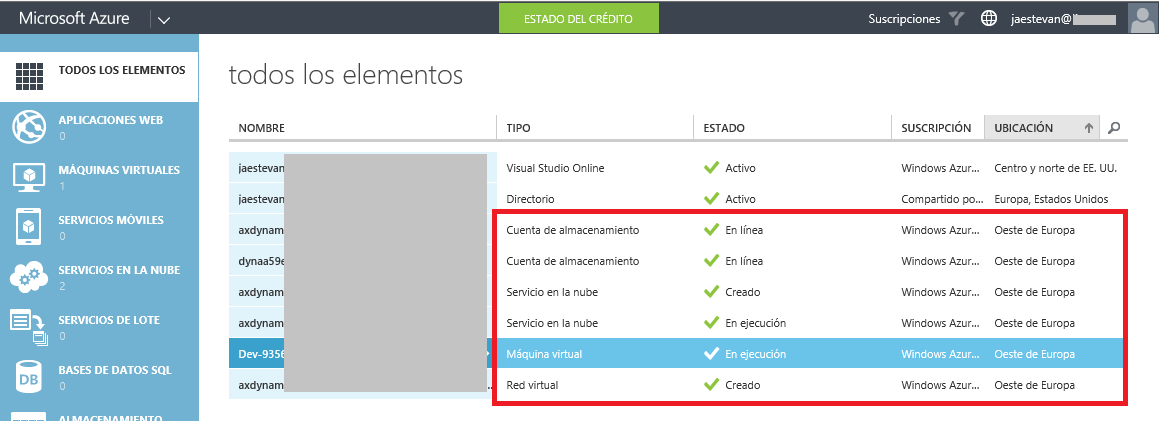
HowTo: Deploy Microsoft Dynamics AX 7 on Azure
The new Microsoft Dynamics AX, as we know, is only available in its Azure version for now. In any case, even when the on-premise version is published, development environments will be self-contained virtual machines that we can deploy on Azure or set up in local environments.
We’re going to take advantage of today when Scott Guthrie (Executive VP Microsoft Cloud and Enterprise) announced the availability of the public preview during Convergence 2015 EMEA in Barcelona, to see how to deploy one of those development/demo machines and start taking a look at the platform, it’s very easy.
Read more
Fixing DB synchronization problems in Microsoft Dynamics AX 2012
Sometimes when synchronizing the database in Microsoft Dynamics AX 2012 we get some nonsense error messages. In my example, I’m getting an error stating that it can’t change the data type in a table field. But this field doesn’t exists on this table, same error says that is trying to convert a data field into a field of another table… weird.
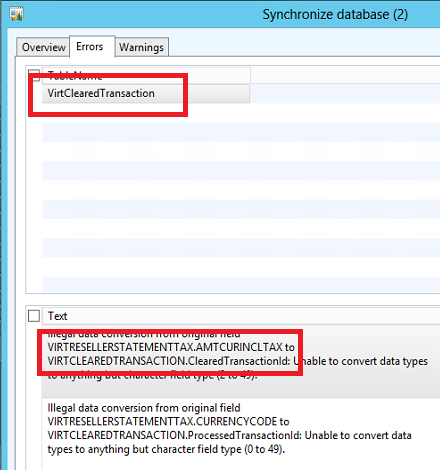
This is an indicator that we are facing an ID problem with the table and/or the table fields. Unfortunately, we don’t have the proper tools to diagnose and fix this kind of problems, so we need to use dirty tricks like fixing the conflict directly in the database.
Read more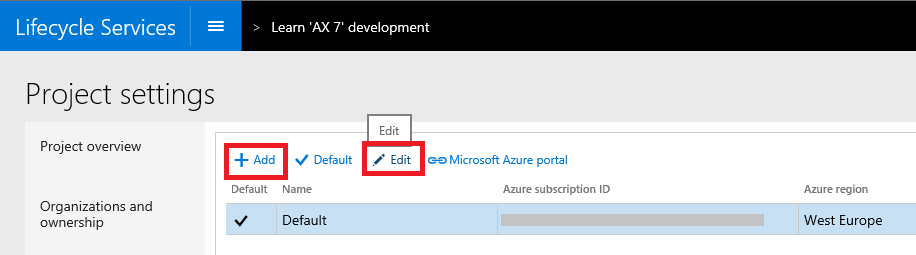
Prepare Yourself for the New Microsoft Dynamics AX
We have already commented several times that Lifecycle Services is going to be a fundamental piece when managing the infrastructure of the new Microsoft Dynamics AX. Tasks such as deploying new environments, modifications, updates, monitoring, etc. will be LCS’s responsibility in the short term, so while we wait for the public preview launch, we can start preparing our LCS to have it ready on launch day.
Connect LCS with Azure Subscriptions
The first thing we need to do is connect our LCS project to our Azure subscriptions, which will be essential to deploy our work environments, including development, testing, demo, build, etc.
Read moreMicrosoft Dynamics AX 2012 Label Codes Using Team Foundation Server Branches (ALM-VIII)
Fortunately for us, label integration with TFS in Microsoft Dynamics AX 2012 improved enormously to the point of becoming almost transparent, which is a significant improvement over previous versions. When we create a label in an AX instance managed through TFS, a temporary personal label code is created that is unique only within that instance (in the form @$XXX).
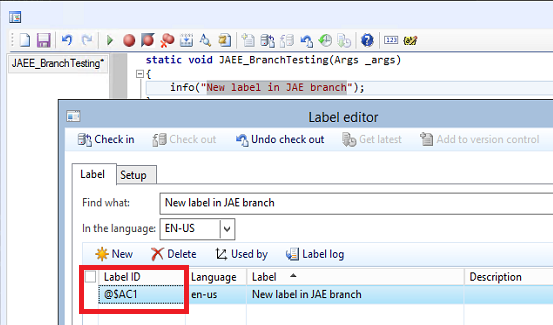
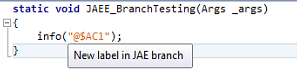
The only thing to keep in mind is that at check-in time we must include both the object that uses the temporary label and the label file where that code was created. At that moment, the TFS integration detects the temporary code and replaces it with a final code coherent with the label file version stored on the server.
Read moreThe "New" Dynamics AX
Microsoft has officially announced today, finally, the new version of our favorite ERP called “Dynamics AX” or “New Dynamics AX”, in line with other products published in the cloud like Visual Studio Online (now called Visual Studio Team Services).
Omitting any version number, they draw attention to the objective of converting AX into a software as a service platform (SaaS), so that the specific version is not too important when receiving constant and frequent automatic updates. Personally (there is no confirmation of this) I would bet that the on-premise version that will be published in a few months will include a version number as usual, to differentiate it from its sibling in Azure.
Read more