
Microsoft MVP Global Summit 2015
Back into the real world, I have to write some lines about the event where all MVPs over the world were invited last week in the Microsoft campus at Redmond (Washington), the Microsoft MVP Global Summit 2015. That is, in my own experience, one of the best reasons to try to maintain this amazing award. Once a year gives you the opportunity to enjoy the best Microsoft Dynamics training you can ever get, directly delivered by Program Managers and the development team, and at the same time spent almost a week of community with the rest of MVPs from all countries.
Read more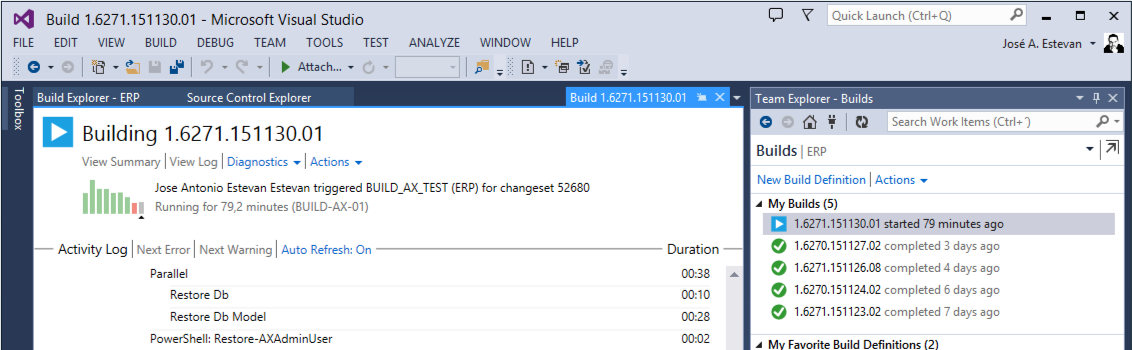
Version Control in Microsoft Dynamics AX 2012 Using Team Foundation Server Branches (ALM-VII)
In previous chapters we discussed how to install and configure Team Foundation Server, as well as the possibilities it offers to manage tasks and manage source code from our Microsoft Dynamics AX 2012 instance. We covered basic but essential operations to check code in and out from the server and the resulting benefits, such as storing complete object change history, reviewing object history, reverting to previous versions, discarding unconfirmed changes, etc.
However, there are problems basic source code management cannot solve. For example, in a regular ERP installation, while we provide daily support and small fixes, we are also running larger parallel developments. These parallel streams need to be integrated into production code somehow, but if we use the same server for development and maintenance, we eventually reach a point where all developments must be fully finished before clean and safe production deployment. Likewise, if our company develops a product, we need to continue building future versions while supporting released versions, sometimes across multiple AX versions. How can we ensure an urgent hotfix built for one customer reaches all product versions that need it, in a clean and stable way?
Read more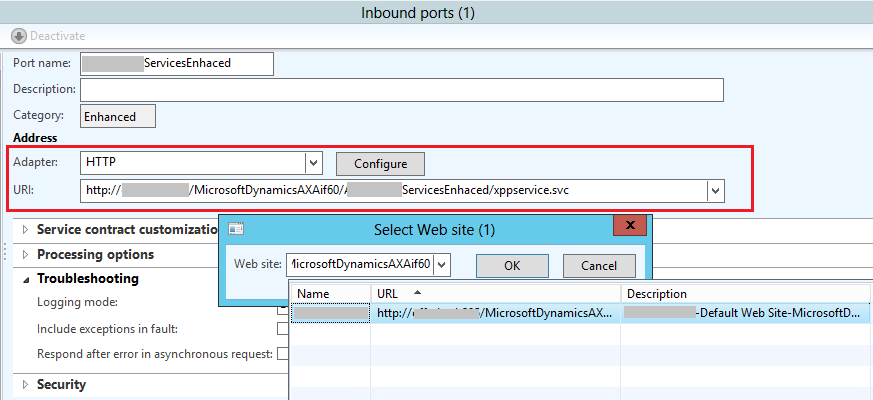
HOWTO: Expose Microsoft Dynamics AX 2012 Services on an External IIS
To expose Microsoft Dynamics AX 2012 web services outside our network, we need to install an IIS service that manages connectivity and security with “the outside world”. Installing this service depends on your network setup and ideally should be done by people specialized in these tasks (typically your infrastructure team). Once installed, connecting that IIS service to our AX instance is quite straightforward.
Before starting the installation itself, let’s check a few prerequisites.
Read moreHOWTO: Impersonate Another User to Execute Code in X++
Although this is not common and goes against a few Best Practices, in very specific scenarios we may need to execute a X++ fragment (a method call) in the context of a user different from the one running the current session, either from a client session or a Batch process. To execute a method call under a specific user, we use this code:
// ...

// User that will execute the method
UserId postingUserId = parms.PostingUserId != '' ? parms.PostingUserId : curUserId();

new RunAsPermission(postingUserId).assert();

// Call to: MyClass.myClassMethod(methodParm1, methodParm2)

// BP Deviation Documented
runAs(postingUserId, classNum(MyClass), 'myClassMethod', [methodParm1, methodParm2]);

CodeAccessPermission::revertAssert();

// ...
I insist this is not common and, as always when doing this kind of thing, it introduces some security risks. Still, I leave the code here so I can find it next time I need it ;)
Source Code Control with TFS in Microsoft Dynamics AX 2012 (ALM-VI)
In previous chapters of this series we already discussed how to install and/or configure our Microsoft Team Foundation Server instance, and also how to use it to manage our tasks and requirements. This article is the final part focused on the basic integration functionality between Microsoft Dynamics AX 2012 and TFS, so we can start tackling more advanced topics in the next posts.
In this article we will see how to work with TFS for source code version control (VCS), which is the first step to use the most advanced features of the system in terms of ALM capabilities. Basically, version control ensures that any change made to system objects is recorded, including date, author, which other objects were changed at the same time, and why (through check-in comments). This allows us to revert changes, return to previous versions, compare the current object state with older versions, review the changes made by a developer on a specific day (for code reviews), associate changes to a specific task to see everything needed to complete it, and much more. The three most obvious operations required by any version control system are: adding new objects, check-in and check-out (translated in AX as Protect and Unprotect) and Sync.
Read moreCumulative Update 9 for Microsoft Dynamics AX 2012 R3

The next cumulative update for Microsoft Dynamics AX 2012 R3 is now available: CU9 (6.3.2000.326). This update can be installed through the Updates feature in Lifecycle Services, as has been common since R3. More details about installation process improvements are available in the installation guide linked below.
The TechNet page detailing changes in this update is also linked below. From a technical perspective, there are no major architecture changes because CUs mainly include smaller functional updates and country/region regulatory requirements. For Spain, this patch includes updates for electronic invoices for public administration (the FacturaE format, more info here), and changes related to tax model 347 (more info).
Read moreMicrosoft Dynamics 'AX 7' / Rainier
The news that there is an upcoming version of Microsoft Dynamics AX (version 7) and that this will be a revolution in terms of the technology that drives it and the user experience is not new, we mentioned it here back in August 2013. Microsoft has been discussing the Rainier project for several years at different events, but the interesting news is still under NDA so it cannot be published yet.

HOWTO: Events in AX 2012 to Minimize Conflicts
As you can guess from some of my previous posts, I am a faithful defender of one of the great forgotten things of AX 2012: Events
In my effort to evangelize for its use, I’ve come across a very clear example of its advantages. At this point I suppose almost everyone knows the possibility of adding new options to the Add-Ins menu of the AX 2012 development environment and earlier. It’s really easy, you just have to create a new class with a regular main method, a menu item that points to that class, and add the menu item to the standard SysContextMenu menu. With this we get our menu item to appear when we right-click on AOT elements, for example (Startup Project is the new add-in):
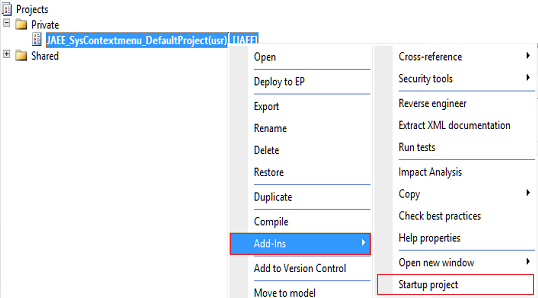 However, to do it really well, some additional modifications are needed. In my example, the new add-in is used to convert the selected project into the startup project for the current user. It’s simple, but it serves us as an example of a add-in that should only appear when we right-click on a project, and not on any other type of AOT element. For that, as the documentation shows, we must modify the verifyItem method of the SysContextMenu class, which is a nightmare of if-else and switches to determine whether the element should be displayed or not, depending on the class that calls it, the type of element and a long and disastrous etcetera.
But we are elegant programmers so, in order not to contribute to worsening that disaster, instead of modifying the method we’re going to add an event handler (Event Handler) by right-clicking on the method.
However, to do it really well, some additional modifications are needed. In my example, the new add-in is used to convert the selected project into the startup project for the current user. It’s simple, but it serves us as an example of a add-in that should only appear when we right-click on a project, and not on any other type of AOT element. For that, as the documentation shows, we must modify the verifyItem method of the SysContextMenu class, which is a nightmare of if-else and switches to determine whether the element should be displayed or not, depending on the class that calls it, the type of element and a long and disastrous etcetera.
But we are elegant programmers so, in order not to contribute to worsening that disaster, instead of modifying the method we’re going to add an event handler (Event Handler) by right-clicking on the method.
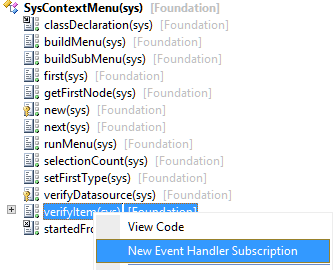 We adjust the properties of the new event handler so they point to a new class we’ve created for our add-in:
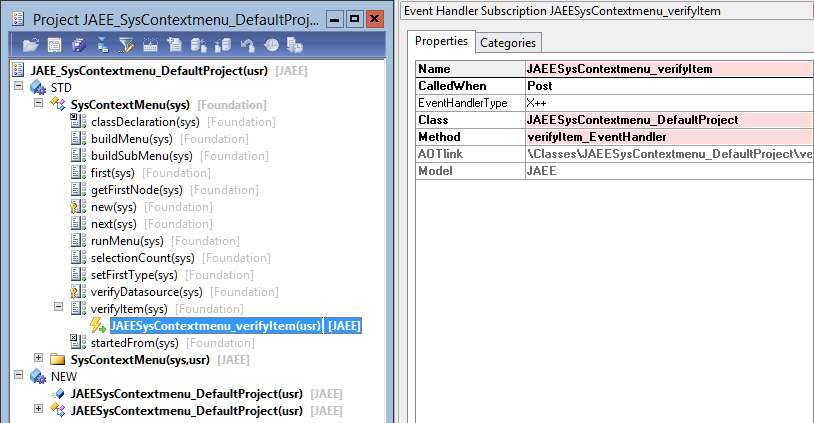 The code that handles the event, more or less the same code we would have included in the original method, is as follows:
/// /// Event-Handler that will decide if the menuitem is shown or not.
///
///
/// IdentifierName menuItemName
/// MenuItemType menuItemType
///
/// /// It is important not to break here the behavior of the original method
///
public static void verifyItem_EventHandler(XppPrePostArgs _args)
{
JAEESysContextmenu_DefaultProject defaultProjectClass;
SysContextMenu contextMenu = _args.getThis();
// Original method arguments
IdentifierName menuItemName = _args.getArgNum(1);
MenuItemType menuItemType = _args.getArgNum(2);
if (menuItemType == MenuItemType::Action &&
menuItemName == menuitemActionStr(JAEESysContextmenu_DefaultProject))
{
// We do not allow selecting multiple projects
if (contextMenu.selectionCount() == 1)
{
defaultProjectClass = JAEESysContextmenu_DefaultProject::construct(contextMenu);
// I modify the return value of the original method
_args.setReturnValue(defaultProjectClass.isProjectMenu() ? 1 : 0);
}
else
{
_args.setReturnValue(0);
}
}
}
In this way our event handler runs after the original verifyItem has been executed, allowing us to modify the return value but, as can be seen in the previous image, NOT the original class has been modified which remains in the sys layer and the Foundation model and, therefore, will not affect future product updates. We have modified the functionality of the standard class without causing any impact on it.
The project containing the fully functional add-in can be downloaded from the link at the bottom of this post, what it does we could summarize in these methods:
The main method is called when you click on the menu item, it’s the entry point of the add-in. What it does is verify that it has indeed been called from a Project type element and if so, it updates the user by assigning this project as the startup project in the options:
static void main(Args _args)
{
JAEESysContextmenu_DefaultProject defaultProjectClass;
if (!_args)
throw error(Error::wrongUseOfFunction(funcname()));
if (SysContextMenu::startedFrom(_args))
{
defaultProjectClass = JAEESysContextmenu_DefaultProject::construct(_args.parmObject());
// The call to this function is only allowed from Projects
if (defaultProjectClass.isProjectMenu())
defaultProjectClass.updateStartupProject();
else
throw error(Error::wrongUseOfFunction(funcname()));
}
}
To check if the element that called this class is a project I use my isProjectMenu function. This logic can be obtained by looking at the existing methods of the standard SysContextMenu class:
private boolean isProjectMenu()
{
TreeNode firstNode = sysContextMenu.first();
if (firstNode.handle() == classnum(ProjectNode))
return true;
return false;
}
The final update to assign the startup project is very simple:
private void updateStartupProject()
{
UserInfo userInfo;
ttsBegin;
The code that handles the event, more or less the same code we would have included in the original method, is as follows:
/// /// Event-Handler that will decide if the menuitem is shown or not.
///
///
/// IdentifierName menuItemName
/// MenuItemType menuItemType
///
/// /// It is important not to break here the behavior of the original method
///
public static void verifyItem_EventHandler(XppPrePostArgs _args)
{
JAEESysContextmenu_DefaultProject defaultProjectClass;
SysContextMenu contextMenu = _args.getThis();
// Original method arguments
IdentifierName menuItemName = _args.getArgNum(1);
MenuItemType menuItemType = _args.getArgNum(2);
if (menuItemType == MenuItemType::Action &&
menuItemName == menuitemActionStr(JAEESysContextmenu_DefaultProject))
{
// We do not allow selecting multiple projects
if (contextMenu.selectionCount() == 1)
{
defaultProjectClass = JAEESysContextmenu_DefaultProject::construct(contextMenu);
// I modify the return value of the original method
_args.setReturnValue(defaultProjectClass.isProjectMenu() ? 1 : 0);
}
else
{
_args.setReturnValue(0);
}
}
}
In this way our event handler runs after the original verifyItem has been executed, allowing us to modify the return value but, as can be seen in the previous image, NOT the original class has been modified which remains in the sys layer and the Foundation model and, therefore, will not affect future product updates. We have modified the functionality of the standard class without causing any impact on it.
The project containing the fully functional add-in can be downloaded from the link at the bottom of this post, what it does we could summarize in these methods:
The main method is called when you click on the menu item, it’s the entry point of the add-in. What it does is verify that it has indeed been called from a Project type element and if so, it updates the user by assigning this project as the startup project in the options:
static void main(Args _args)
{
JAEESysContextmenu_DefaultProject defaultProjectClass;
if (!_args)
throw error(Error::wrongUseOfFunction(funcname()));
if (SysContextMenu::startedFrom(_args))
{
defaultProjectClass = JAEESysContextmenu_DefaultProject::construct(_args.parmObject());
// The call to this function is only allowed from Projects
if (defaultProjectClass.isProjectMenu())
defaultProjectClass.updateStartupProject();
else
throw error(Error::wrongUseOfFunction(funcname()));
}
}
To check if the element that called this class is a project I use my isProjectMenu function. This logic can be obtained by looking at the existing methods of the standard SysContextMenu class:
private boolean isProjectMenu()
{
TreeNode firstNode = sysContextMenu.first();
if (firstNode.handle() == classnum(ProjectNode))
return true;
return false;
}
The final update to assign the startup project is very simple:
private void updateStartupProject()
{
UserInfo userInfo;
ttsBegin;
Introduction to PowerShell for Dynamics AX 2012 Developers (PS-I)
PowerShell (we will abbreviate it as PS from now on) is an amazing tool, among many other things, for administering servers and applications, including Microsoft Dynamics AX 2012. AX 2012 includes its own PS module, called “Microsoft Dynamics AX 2012 Management Shell”, with commands we will review in upcoming posts.
Those commands are very useful, but we can also get a lot of value from standard PowerShell features for many day-to-day tasks.
Read moreHowTo: Take Control of an AX 2012 Backup Using PowerShell
A few days ago I posted a comment on Twitter about PowerShell possibilities and got a lot of feedback.
I assume there is strong interest in learning more about PowerShell capabilities applied to Microsoft Dynamics AX, and I’m preparing a long article (probably a series) on this topic that should be ready in the coming weeks. PowerShell is an extremely powerful and, at the same time, unusual tool. Developers usually see it as an admin tool (it is a console), while sysadmins often see it as a developer tool (it is code). Curious, right?
Read more